Food Expense Report
It's a good idea to have a food budget that determines how much money you want to spend on food each month. It's also a really good idea to keep accounts of how much money you actually spend on food, so you don't end up overspending your food budget.
What Is a Food Budget?
Food accounts are accounts where you keep track of entries related to food purchases. If you keep track of your food spending, it typically means you have food accounts that you want to stay within. A food budget is usually set on a monthly basis, but if you’re keeping a food ledger, we recommend doing so on a week-by-week basis. This way, you stay closely attuned to your food spending and can quickly see if you’re overspending over the course of a month.
Why Should You Keep a Food Budget?
The main reason for keeping a food budget is to track your food spending. It’s easy to set a fixed food budget of, say, 5,000 DKK per month, but it’s just as easy to end up overspending month after month. If you actively track your food spending and keep week-by-week accounts, you’ll gain better control over your food spending. This can easily be a great and simple way to save a lot of money—without even having to compromise much on your standard of living. You can often save a lot of money by cutting out takeout, making a meal plan, and doing a big grocery shop.
Create a meal plan
By creating a meal plan that covers an entire week, you’re taking the first step toward healthy eating. It can seem overwhelming to plan for an entire week, especially since you have to come up with 3–5 recipes. We recommend setting aside a specific time each week to plan your meals—perhaps together—make a shopping list, and go grocery shopping. This could be, for example, every Saturday morning. Once you’ve scheduled it in your calendar and made it a regular routine, you’ll find that it’s much easier than shopping day by day—and you can save a lot of money.
Shop once a week
By limiting your grocery shopping to once a week and sticking to a shopping list, you can avoid those easy—and often unhealthy—temptations. If you go grocery shopping after a long day at work and without a shopping list, it’s easy to be tempted to buy things you don’t really need. There is therefore a significant financial benefit to consolidating your shopping trips and shopping only once a week.
How to Keep a Food Budget
Personal Finance has made it easy to keep track of your food budget. Check out the step-by-step guide below to get started with your food budget today.
When you’re on “My Overview,” simply click the “Create Accounts” button in the upper-right corner.
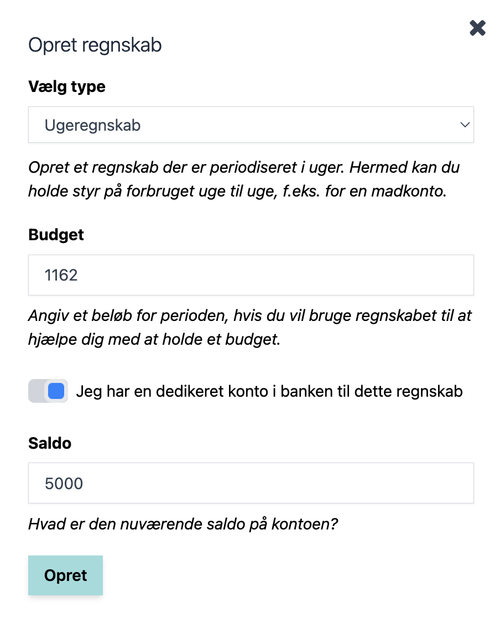
Under “Type,” select “Weekly Report.”
Next, enter your budget. Your food budget is typically set based on how much you’d like to spend on food for an entire month, but since we recommend tracking your food expenses on a weekly basis, we’ll need to convert your food budget to a weekly budget.
Fortunately, it’s easy. Just divide your monthly budget by 4.3, and you’ll have your weekly budget. If your monthly budget is 5,000 DKK, that means your weekly budget is 1,162 DKK.
If you don’t already have a dedicated account for food expenses, we recommend that you set one up. This will make it even easier to see if you’re overspending on your food budget.
When you’re ready and have filled in all the fields, click Create.
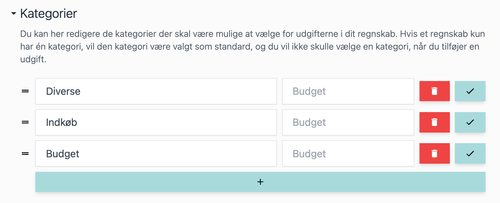
Once your new food budget has been created, start by editing the categories in the accounts.
We recommend that you create three categories: Purchases, Budget, and Miscellaneous.
You can use the “Budget” category when you transfer money to the account to ensure that the balance matches the one at the bank.
Next, switch the view from list view to category view. This gives you a good overview and makes it easier to add expenses.
You are now ready to add expenses to your food budget, which will give you an overview and insight into your food spending.
