Project Financial Statements
A project budget can help you keep track of your finances when you’re undertaking a project, such as renovating a home. If you need to take out a loan from the bank for the project, you’ll also need to know your budget for the various expense categories.
Why Should You Keep Accounts of Your Project?
There are several good reasons for that.
If your project is to be financed through a bank loan, the bank will typically require a project plan that includes a budget for expenses. Even if you’re not seeking financing from a bank, it’s always a good idea to create a budget for the project before it begins. This gives you a good opportunity to think the project through and may even provide insight into whether there’s room for the project right now.
Second, it often happens that projects—such as home renovations—go over budget—sometimes even by a wide margin. Accounts with accompanying budgeting can’t always solve this problem, but they do provide ongoing insight into the project’s finances, allowing you to take action if the project is getting out of hand.
How to Set Up a Project Account
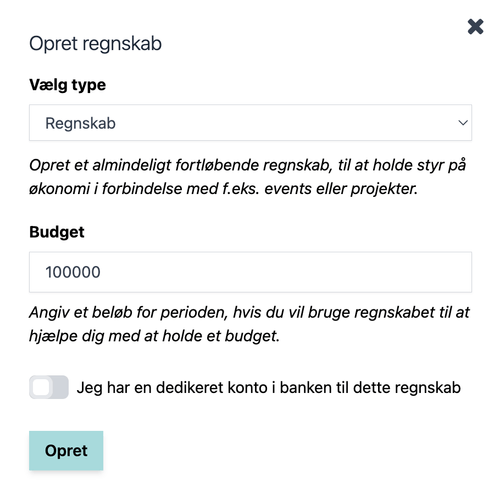
When you’re on “My Overview,” click the “Create Accounts” button in the upper-right corner.

Select “Accounts” under “Type.”
Under “Budget,” you can enter the total budget for the entire project. For example, if you expect a home renovation to cost 100,000 DKK, enter 100,000 here.
If you have a dedicated account for this at the bank, you can select this option to keep your account balance up to date.
Once you have filled in the fields, click the Create button.
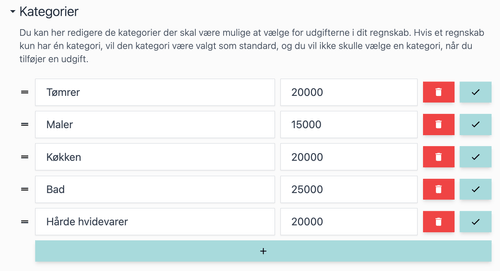
Once your new accounts have been set up, you should start by editing the categories in the accounts. Before you start a project, you’ll typically be able to group expenses.
In the example of a home renovation, these categories could include, for example, carpentry, painting (including spackling), kitchen, bathroom, major appliances, etc.
Make sure your categories reflect those groupings.
Next, switch the view from list view to category view. This will give you a good overview of how the project finances are progressing.

You now have a really good starting point for your project financial statements, as you can see in the image below.

Every time you have an expense for your project, simply enter it as a transaction under the correct category. You’ll see how the balance and spending for the project change over time, and it’s easy to tell if you’re overspending in a particular category.
